Welcome to the ultimate guide on Azure Active Directory! Whether you’re an IT admin, a security officer, or a cloud enthusiast, understanding this powerful identity and access management service is crucial in today’s digital landscape. Let’s dive into what makes Azure AD a game-changer.
What Is Azure Active Directory?

Azure Active Directory (Azure AD) is Microsoft’s cloud-based identity and access management (IAM) service. It enables organizations to securely manage user identities, control access to applications, and enforce security policies across cloud and on-premises environments. Unlike traditional on-premise Active Directory, Azure AD is built for the cloud-first world.



Core Purpose of Azure Active Directory
The primary goal of Azure Active Directory is to provide seamless and secure access to enterprise resources. It acts as the backbone for identity management in Microsoft 365, Azure, and thousands of third-party SaaS applications. With Azure AD, users can log in once and access multiple services without re-entering credentials—thanks to single sign-on (SSO).
- Centralizes identity management in the cloud
- Supports hybrid environments (cloud + on-premises)
- Enables secure access from any device, anywhere
Differences Between Azure AD and On-Premises AD
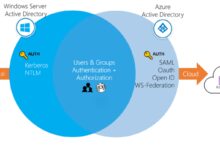
While both systems manage identities, they serve different architectures. Traditional Active Directory is designed for Windows domain networks and relies heavily on LDAP, Group Policy, and domain controllers. In contrast, Azure Active Directory uses REST APIs, OAuth, OpenID Connect, and SAML for modern authentication.
- On-prem AD: Focuses on device and user management within a network
- Azure AD: Focuses on user and application access in the cloud
- Azure AD does not replace on-prem AD but complements it
“Azure Active Directory is not just a cloud version of Active Directory—it’s a reimagined identity platform for modern workforces.” — Microsoft Tech Community
Key Benefits of Using Azure Active Directory
Organizations around the world are migrating to Azure Active Directory because it offers significant advantages over legacy systems. From improved security to streamlined user experiences, Azure AD delivers tangible value across departments.
Enhanced Security and Identity Protection
Azure Active Directory provides advanced threat detection and identity protection features. With tools like Identity Protection and Conditional Access, administrators can detect risky sign-in behaviors and automatically enforce remediation policies.
- Real-time monitoring of suspicious login attempts
- Integration with Microsoft Defender for Cloud Apps
- Automated risk-based policies to block or challenge users
For example, if a user logs in from an unfamiliar location or device, Azure AD can prompt multi-factor authentication (MFA) or even block access until verified. This proactive approach reduces the risk of account compromise.
Seamless Single Sign-On (SSO) Experience
One of the most loved features of Azure Active Directory is its ability to enable single sign-on across thousands of applications. Users can access Microsoft 365, Salesforce, Dropbox, and custom apps with one set of credentials.
- Supports SAML, OAuth 2.0, OpenID Connect, and password-based SSO
- Reduces password fatigue and improves productivity
- Integrates with app galleries containing over 2,600 pre-integrated apps
This means employees spend less time logging in and more time being productive. According to a Microsoft case study, companies using Azure AD SSO report up to a 40% reduction in helpdesk calls related to password resets.
Scalability and Global Reach
As a cloud-native service, Azure Active Directory scales automatically to support organizations of all sizes—from startups with 10 users to global enterprises with millions.
- Available in multiple regions worldwide for low-latency access
- Supports high availability and disaster recovery by design
- Handles peak authentication loads during business-critical events
Unlike on-prem solutions that require hardware upgrades and manual scaling, Azure AD grows with your business effortlessly.
Azure Active Directory Authentication Methods
Authentication is at the heart of Azure Active Directory. The platform supports a wide range of methods to verify user identity, ensuring both security and usability.
Password-Based Authentication
While passwords are still widely used, Azure Active Directory enhances them with policies that enforce complexity, expiration, and screening against known breaches.
- Password hash synchronization ensures on-prem passwords work in the cloud
- Smart Lockout prevents brute-force attacks
- Integration with Windows Hello for Business allows passwordless sign-ins
However, Microsoft strongly recommends moving beyond passwords due to their vulnerability to phishing and credential stuffing.
Multi-Factor Authentication (MFA)
Azure Active Directory Multi-Factor Authentication adds an extra layer of security by requiring users to verify their identity using two or more methods.
- Phone calls, text messages, or mobile app notifications
- Hardware tokens or FIDO2 security keys
- Biometric verification via authenticator apps
According to Microsoft, enabling MFA blocks over 99.9% of account compromise attacks. It’s one of the most effective security controls available today.
Passwordless Authentication Options
Azure Active Directory supports a full passwordless experience using modern authentication methods.
- Windows Hello for Business: Uses biometrics or PINs tied to a device
- Microsoft Authenticator App: Push notifications or biometric approval
- FIDO2 Security Keys: Physical USB/NFC devices that provide phishing-resistant authentication
These methods eliminate the risks associated with passwords while improving user experience. For instance, employees can unlock their laptops with a fingerprint and access cloud apps without typing a single password.
Conditional Access and Security Policies in Azure Active Directory
Conditional Access is one of the most powerful features in Azure Active Directory. It allows administrators to create dynamic access rules based on user, device, location, application, and risk level.
How Conditional Access Works
Conditional Access policies evaluate each sign-in attempt against predefined conditions. If the conditions are met, specific access controls are enforced.
- Example: Require MFA when accessing email from outside the corporate network
- Example: Block access from unmanaged devices to sensitive apps
- Example: Allow access only from compliant devices enrolled in Intune
These policies are built using a simple “if-then” logic: If a user meets certain criteria, then apply specific access controls. This granular control helps organizations maintain zero trust principles.
Integration with Identity Protection
Azure AD Identity Protection uses machine learning to detect risky behaviors such as sign-ins from anonymous IPs, impossible travel, or leaked credentials.
- Risk detections include user risk, sign-in risk, and risk events
- Can be integrated directly into Conditional Access policies
- Allows automatic remediation (e.g., require password change or MFA)
For example, if Identity Protection detects a high sign-in risk, a Conditional Access policy can force the user to complete MFA or be blocked entirely. This integration creates a responsive security posture that adapts in real time.
“Conditional Access turns static policies into intelligent, context-aware decisions that protect your organization without hindering productivity.” — Microsoft Azure Documentation
User and Group Management in Azure Active Directory
Effective identity management starts with organizing users and groups. Azure Active Directory provides flexible tools to manage identities at scale.
Creating and Managing Users
Administrators can create users manually, through CSV upload, or automatically via Azure AD Connect from on-premises Active Directory.
- Assign licenses, roles, and contact information
- Enable self-service password reset (SSPR)
- Configure profile attributes like department, job title, and manager
Additionally, guest users can be invited to collaborate securely from external organizations using B2B collaboration features.
Role-Based Access Control (RBAC)
Azure Active Directory uses RBAC to assign permissions based on job functions. Instead of giving full admin rights, admins can assign granular roles like:
- Global Administrator
- Helpdesk Administrator
- Application Administrator
- Security Reader
- License Administrator
This principle of least privilege minimizes the risk of accidental or malicious changes. Microsoft recommends avoiding the use of Global Administrator accounts for daily tasks.
Dynamic Groups Based on Attributes
Azure AD supports dynamic groups that automatically add or remove members based on rules.
- Example: All users in the Sales department with a license assigned
- Example: Devices marked as compliant in Intune
- Example: Users located in the United States
These groups reduce administrative overhead and ensure access remains accurate as employee roles change.
Application Integration and Single Sign-On with Azure Active Directory
One of Azure Active Directory’s standout capabilities is its ability to integrate with thousands of applications, both cloud and on-premises.
Pre-Integrated SaaS Applications
Azure AD offers a gallery of over 2,600 pre-integrated applications that can be configured for SSO in minutes.
- Popular apps include Office 365, Salesforce, Workday, Zoom, and Dropbox
- Each app comes with step-by-step setup guides
- Supports automatic user provisioning (SCIM) for lifecycle management
For example, when a new employee is added to Azure AD, they can automatically gain access to all required apps without manual setup.
Custom Application Integration
Organizations can also add custom or in-house applications to Azure AD using standard protocols.
- SAML 2.0 for web apps
- OpenID Connect for modern web and mobile apps
- Password-based SSO for legacy apps without API support
This flexibility ensures that even niche or internal tools can benefit from centralized identity management and SSO.
Automatic User Provisioning (SCIM)
Azure AD supports System for Cross-domain Identity Management (SCIM) to automate user provisioning and deprovisioning.
- Creates, updates, and disables users in target apps automatically
- Reduces security risks from orphaned accounts
- Ensures compliance with access review policies
For instance, when an employee leaves the company, Azure AD can automatically revoke their access to Salesforce, Slack, and other integrated apps—minimizing exposure.
Hybrid Identity with Azure Active Directory Connect
Many organizations operate in hybrid environments, where some resources remain on-premises while others move to the cloud. Azure Active Directory Connect bridges this gap.
What Is Azure AD Connect?
Azure AD Connect is a tool that synchronizes identities from on-premises Active Directory to Azure Active Directory.
- Enables single sign-on using password hash sync or pass-through authentication
- Supports federation with AD FS (Active Directory Federation Services)
- Allows selective synchronization of OUs, groups, and attributes
This ensures users have a consistent identity across environments, reducing confusion and improving security.
Password Hash Synchronization vs. Pass-Through Authentication
There are two primary methods for authenticating hybrid users in Azure AD:
- Password Hash Sync (PHS): Copies password hashes from on-prem AD to Azure AD. Simple to set up and highly available.
- Pass-Through Authentication (PTA): Validates passwords against on-prem AD in real time. No password hashes stored in the cloud.
Microsoft recommends PTA for better security, as it avoids storing password hashes in the cloud. However, PHS is often preferred for its resilience during internet outages.
Federation with AD FS
For organizations requiring advanced identity scenarios, Azure AD supports federation via AD FS.
- Enables smart card logins and certificate-based authentication
- Supports claims-based access control
- Useful for regulated industries with strict compliance needs
However, AD FS requires additional infrastructure and maintenance, so many organizations are moving toward PTA or PHS for simplicity.
Security and Compliance Features in Azure Active Directory
Azure Active Directory is designed with security and compliance at its core, helping organizations meet regulatory requirements and defend against modern threats.
Identity Governance and Access Reviews
Azure AD provides tools for managing who has access to what, ensuring compliance with least privilege principles.
- Access reviews allow managers to periodically confirm user access
- Entitlement management enables just-in-time (JIT) access to apps
- Tracks access history for audit purposes
These features are essential for passing audits and reducing the risk of insider threats.
Azure AD Privileged Identity Management (PIM)
PIM allows organizations to manage, control, and monitor access to critical resources.
- Enables just-in-time administrative access
- Requires approval and justification for elevated access
- Provides time-bound activation of roles (e.g., 2-hour admin session)
Instead of having permanent admin rights, users request access when needed. This significantly reduces the attack surface.
Compliance and Certifications
Azure Active Directory complies with numerous global and industry-specific standards.
- GDPR, HIPAA, ISO 27001, SOC 1/2, FedRAMP, and more
- Regular third-party audits and transparency reports
- Data residency options to meet local regulations
This makes Azure AD a trusted choice for governments, healthcare, finance, and education sectors.
Monitoring and Reporting in Azure Active Directory
Visibility into user activity and system health is critical for security and operations. Azure AD provides comprehensive logging and reporting capabilities.
Sign-In Logs and Activity Monitoring
Azure AD logs every authentication attempt, including success, failure, and risk events.
- View IP addresses, devices, locations, and apps accessed
- Filter logs by user, app, or risk level
- Export data to SIEM tools like Azure Sentinel or Splunk
These logs help detect anomalies, investigate breaches, and troubleshoot access issues.
Audit Logs for Administrative Actions
Every change made by administrators is recorded in audit logs.
- Track user creation, role assignments, policy changes
- Set up alerts for sensitive operations
- Retain logs for up to 30 days (or longer with Azure Monitor)
This accountability ensures transparency and supports compliance requirements.
Custom Alerts and Integration with Security Tools
Azure AD can integrate with Microsoft Sentinel, Intune, and third-party security platforms.
- Create custom alerts for suspicious activities
- Automate responses using playbooks
- Correlate identity data with endpoint and network telemetry
This holistic approach strengthens the organization’s overall security posture.
What is Azure Active Directory?
Azure Active Directory is Microsoft’s cloud-based identity and access management service that enables secure user authentication and authorization across applications and devices.
How does Azure AD differ from on-premises Active Directory?
On-prem AD manages domain-joined devices and users in a local network using LDAP and Group Policy, while Azure AD focuses on cloud-based identity, application access, and modern authentication protocols like OAuth and SAML.
Can Azure AD replace on-premises Active Directory?
Not entirely. While Azure AD can handle cloud identity and access, on-prem AD is still needed for managing traditional Windows domain environments. Most organizations use both in a hybrid setup.
Is multi-factor authentication mandatory in Azure AD?
No, but it is highly recommended. Administrators can enforce MFA through Conditional Access policies to protect sensitive data and prevent unauthorized access.
How do I get started with Azure Active Directory?
You can start by signing up for a free Azure account, creating an Azure AD tenant, and adding users. For hybrid environments, deploy Azure AD Connect to sync on-prem identities.
Throughout this guide, we’ve explored the depth and power of Azure Active Directory—from its core functions to advanced security features. As organizations continue to embrace digital transformation, having a robust identity management system like Azure AD is no longer optional—it’s essential. Whether you’re securing remote workers, integrating SaaS apps, or enforcing zero trust, Azure AD provides the tools you need to stay protected and productive. The future of identity is in the cloud, and Azure Active Directory is leading the way.
Recommended for you 👇
Further Reading: